 By Graham Fisher
Updated November 2026
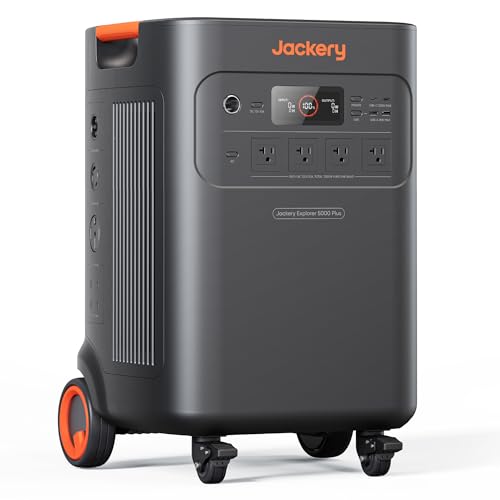
A jackery generator to transfer switch cable connects your portable power station to a transfer switch so that selected circuits in your home can run during an outage. In this guide you will learn what the cable and transfer switch do, how to choose the right cable for your Jackery model and circuit load, and how to make a safe connection. You will also see where a licensed electrician needs to be involved, since the wiring work touches your home’s electrical service.
What the Connection Actually Does
A transfer switch is the device that keeps your home’s electrical system from feeding power backward onto the utility lines while your backup source is running. It lets you choose between grid power and your generator, and it isolates the two so they never energize at the same time. A Jackery station is not a traditional generator, so it does not plug into a home the way a gas unit does. Instead, the station’s output is routed through a cable or inlet into a transfer switch, and the switch feeds the circuits you have selected.
The cable is the physical link between the power station and the transfer switch. Its job is to carry the correct voltage and current safely, with conductors sized for the load and a connector that matches the station’s output port. Getting the cable wrong is one of the most common ways people overload a station or create a fire hazard, so it deserves careful attention before you buy or build anything.
Before You Start: Check Your Equipment
Start by confirming what your specific Jackery model and transfer switch support. Manufacturers publish the rated output (continuous and surge), the output voltage, and the available outlet types. Your transfer switch will have a rated amperage, usually 30 or 50 amps on a 120/240-volt system, and its manual will name the approved generator input method. Match the cable to both ends, not just one.
Key Numbers to Gather
- The continuous wattage rating of your Jackery station and its surge rating
- The output voltage (typically 120 V AC for portable stations; confirm in your manual)
- The amperage rating of the transfer switch and the breaker in your main panel that feeds it
- The total running watts of the circuits you plan to back up (refrigerator, sump pump, CPAP, lights, router)
- The length of run between the station and the transfer switch
Calculating Your Load
Add up the running watts of every circuit you intend to power, then compare that total to the station’s continuous rating. Leave a margin of at least 20 percent. Motors such as refrigerators and sump pumps draw a startup surge several times their running wattage, so confirm the surge rating too. If your load is close to the limit, reduce the circuits on the transfer switch rather than pushing the station to its edge.
Choosing the Right Cable
Cable choice comes down to three things: conductor gauge, connector type, and length. Thicker conductors (lower gauge numbers) carry more current with less voltage drop. A longer run needs a heavier gauge than a short one carrying the same load. Use the gauge recommended in your transfer switch manual or the Jackery documentation, and do not substitute a thinner wire to save space or cost.
Connector type matters as well. Some stations use standard household-style outlets, while others offer dedicated inlets or DC-to-AC pass-through ports. Make sure the cable terminates in a connector that physically matches the station’s port and the transfer switch’s input. Adapters add resistance and failure points, so avoid stacking them.
| Factor | What to Check | Why It Matters |
|---|---|---|
| Conductor gauge | Rated for the full circuit amperage over your run length | Undersized wire overheats and causes voltage drop |
| Connector match | Fits the station output and the transfer switch input | Prevents loose or improvised connections |
| Cable length | Keep as short as practical | Longer runs need heavier gauge |
| Insulation rating | Suitable for outdoor or garage use if applicable | Protects against moisture and abrasion |
| Ground conductor | Present and properly bonded | Required for safe fault clearing |
Step-by-Step Connection Process
The following steps describe the general process. Your transfer switch manual and local electrical code govern the actual installation, and many jurisdictions require a permit and licensed electrician for any work at the panel.
- Turn off the main breaker and confirm the transfer switch is in the grid position.
- Mount the transfer switch near your main panel following the manufacturer’s clearance requirements.
- Run the cable from the Jackery station location to the transfer switch input, securing it along the way and protecting it from heat, water, and foot traffic.
- Terminate the cable at the transfer switch using the marked terminals, torquing each connection to the value in the manual.
- Connect the circuits you want to back up to the transfer switch’s load side, labeling each one clearly.
- Keep the Jackery station powered off and its output disconnected while you finish wiring.
- Have a licensed electrician inspect the panel work and confirm the installation meets code before energizing.
- Test by switching to generator mode, turning on the station, and verifying voltage at each backed-up outlet with a multimeter before relying on it.
Tools and Supplies You Will Need
- Insulated screwdrivers and a torque driver set to the manufacturer’s specification
- A multimeter rated for household AC voltage
- Wire strippers and crimping tools matched to the conductor gauge
- Cable clamps, conduit, or strain relief appropriate for the run
- Labels for circuit identification
Common Mistakes to Avoid
- Using an extension cord or household power strip in place of a properly rated transfer cable
- Undersizing the conductor for the run length and load
- Overloading the station by backing up too many high-draw circuits at once
- Skipping the ground conductor or leaving connections loose
- Backfeeding the utility by bypassing the transfer switch entirely, which is dangerous to line workers
- Leaving the cable exposed to rain or heat sources
Tips for Reliable Backup Power
Test the system at least once a season so you know it works before a storm. Keep a written list of the circuits that are connected to the transfer switch and the approximate wattage of each, so anyone in your household can operate it. Recharge the station promptly after each use, and if you have solar panels, confirm the charge controller and cable setup are compatible with your station’s input ratings. For guidance on sizing your backup, see Jackery Solar Powered Generator: What It Can Run and How to Size One.
If you are comparing transfer switch options, Jackery Manual Transfer Switch: Step-by-Step Setup for Home Backup walks through a manual setup, while Jackery Automatic Transfer Switch: 7 Best Picks for Home Backup (2026) covers systems that switch over without operator input. Read Jackery Smart Transfer Switch: How to Choose and Set It Up Safely if you want app-based monitoring. For a broader view of installation steps, see Jackery Transfer Switch Installation: A Step-by-Step Guide for Home Backup.
Recommended gear
A quality multimeter lets you verify voltage and continuity before and after connecting the cable, which is the most important check you can make.
A torque screwdriver set ensures terminal connections are tightened to the specified value, preventing loose connections that cause heat.
Properly rated cable clamps and strain relief keep the run secure and protected from abrasion where it passes through walls or enclosures.
FAQ
Can I connect a Jackery station directly to my panel?
Direct connection without a transfer switch or interlock is not safe and is prohibited by electrical code in most areas. Always route backup power through an approved transfer switch.
What gauge cable do I need?
It depends on the circuit amperage and run length. Check your transfer switch and Jackery manuals for the recommended gauge, and size up for longer runs.
Do I need a permit?
Permit requirements vary by location. Many areas require one for any work at the main panel. Check with your local building department.
How long will the station run my fridge?
Runtime depends on the station’s capacity and the appliance’s average draw. Estimate by dividing the station’s watt-hour capacity by the average running watts, then reduce the result to account for inefficiency.
Can I back up my CPAP machine this way?
Many people do, since CPAP units draw modest power. Confirm the station’s rating covers the device and keep a backup plan for medical equipment. Consult your physician or equipment supplier for guidance.
Is it safe to run the station in the garage?
Portable stations should be used in a ventilated area, out of direct rain and away from flammable materials. Follow the manufacturer’s operating guidance for temperature and placement.
Should a professional install this?
Yes, for panel work a licensed electrician is strongly recommended. They can confirm sizing, code compliance, and safe interlocking with your service.
Conclusion
A jackery generator to transfer switch cable setup gives you controlled backup power for essential circuits when the grid goes down. Choosing the correct gauge, connector, and length, and respecting the load limits of your station, are what make the system safe and dependable. Because panel work carries real risk, plan the installation carefully and bring in a licensed electrician to verify the final connection before you rely on it.
Related reading
- Jackery Smart Transfer Switch Manual: 5 Best Options Compared (2026)
- Jackery Manual Transfer Switch Installation: A Step-by-Step Guide
Ready to choose one?
About Graham Fisher
Graham Fisher is part of our editorial team and reviews and edits our solar generators for home backup & emergencies guides, checking product details against manufacturer specifications and owner feedback.