By Emily Parker
Updated November 2026
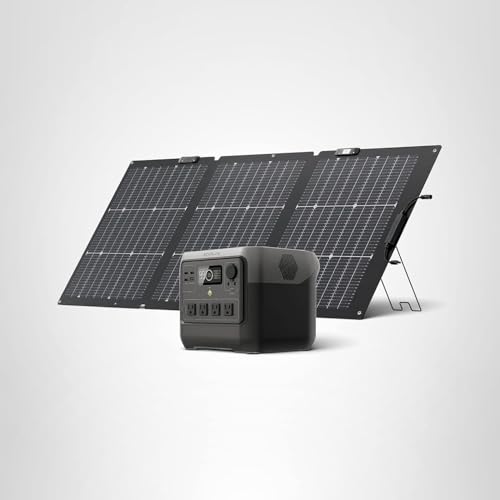
An EcoFlow River 2 solar panel lets you recharge a River 2 power station from sunlight instead of a wall outlet, which matters when the grid is down. This guide explains how to match a compatible panel to the River 2, connect it correctly, and estimate how long recharging will take. Your goal is a reliable backup charging setup for a fridge, router, phone and CPAP or sump pump during short outages.
Check Compatibility Before You Buy or Connect
The River 2 is a compact power station with a solar input designed for portable panels. Before connecting anything, confirm that the panel uses the connector type and output range the River 2 accepts. Manufacturers specify maximum input limits for each model, and exceeding them can trigger input protection and slow or stop charging. If you own a panel from another brand, check its open-circuit voltage against the River 2 input specification in the product manual. For a broader look at how panels and power stations pair, see Solar Panels for EcoFlow Delta Pro: How to Choose and Connect Them (2026).
Shopping for one? See our guide: 8 Best Ecoflow NextGen 220W Bifacial Portable Solar Panels Compared.
Connect the Panel Safely
Connection is simple, but the order matters. Follow these steps:
- Turn the River 2 off and make sure no loads are plugged into it.
- Place the panel in full sun, tilted toward the sun if it has a kickstand. Avoid placing it on a roof where it can slide.
- Connect the panel’s cable to the River 2’s solar input port until it seats firmly.
- Turn the power station on and confirm the solar input indicator shows charging.
- Check the app or display after 10 to 15 minutes to confirm the input wattage is rising.
If the input reads zero, check that the port is fully seated, the panel is not shaded, and the cable is not damaged. Connector details vary by model, so the guide on EcoFlow Solar Panel Connector: How to Wire Panels Safely (2026) covers wiring basics in more depth.
Estimate Real-World Charging Time
Panels are rated under ideal lab conditions, so real output is almost always lower. Clouds, heat, dust, angle and time of day all reduce input. A rough method is to take the panel’s rated wattage, multiply by about 0.5 to 0.7 for typical midday conditions, then divide your River 2’s capacity in watt-hours by that number. Account for conversion losses as well, which typically cost some additional energy.
For example, if a panel is rated at 100 watts and you assume 60 watts of real input, a battery with about 256 watt-hours of usable capacity would need roughly four to five hours of steady sun, plus losses. Real recharge time will be longer on overcast days. Plan for a partial charge rather than a full one when the weather is poor.
Plan Your Backup Loads Around Solar Input
Solar recharging works best when you run only essential loads during the day. A phone, laptop and a small router draw little power, while a refrigerator cycles on and off and draws more over time. A CPAP machine can run through the night if the battery is charged beforehand, so top up the River 2 from the wall or a panel during the afternoon. For guidance on sizing a backup system for a full household, see Top 5 EcoFlow Power Stations with Solar Panel Options for Home Backup (2026).
Common Mistakes
- Leaving the panel in partial shade, which can sharply cut output.
- Using a cable or adapter not rated for the panel’s output.
- Assuming the rated wattage equals real charging speed.
- Running heavy loads while trying to recharge from a single small panel.
- Ignoring temperature: very hot panels lose efficiency.
Recommended Gear
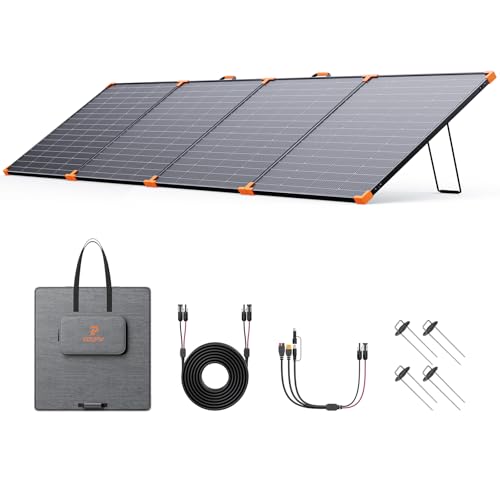
- A compatible EcoFlow portable panel helps because it uses the connector and input range the River 2 is built to accept. View on Amazon
- A panel kickstand or adjustable mount keeps the panel angled toward the sun, which improves input across the day. View on Amazon
- An extension cable rated for solar output lets you place the panel in sun while keeping the power station in shade or indoors. View on Amazon
FAQ
Can an EcoFlow River 2 be charged by solar alone?
Yes, if the panel is compatible and receives enough direct sun. Charging time depends on panel wattage, weather and your battery’s capacity. Consult the manufacturer’s manual for the exact input limits.
How many panels can I connect to a River 2?
The River 2 is designed around a specific maximum solar input. Check the product specifications before adding more than one panel, since exceeding the limit can reduce or stop charging.
Does a solar panel work on cloudy days?
Panels still produce some power on overcast days, but output is much lower. Expect a partial charge rather than a full one, and plan backup loads accordingly.
Conclusion
An EcoFlow River 2 solar panel setup works best when the panel is compatible, placed in full sun and matched to realistic charging expectations. Estimate recharge time using real-world input, not rated wattage, and prioritize essential loads during outages. For electrical or medical backup needs such as CPAP power, consult a qualified professional to confirm your system is sized correctly.
Related reading
Ready to choose one?
About Emily Parker
Emily Parker is part of our editorial team and reviews and edits our solar generators for home backup & emergencies guides, checking product details against manufacturer specifications and owner feedback.