 By Lauren Holland
Updated November 2026
A whole home power backup system keeps your lights, refrigerator, internet and medical equipment running when the grid goes down. In this guide you will learn how to estimate your household’s real power needs, convert them into battery capacity and inverter output, and decide whether you need a portable power station, a solar-plus-battery setup or a permanently installed system. The process takes about an hour with a utility bill and a notepad.
What a Whole Home Power Backup System Actually Does
Most people picture a whole home power backup system as a single box that powers everything in the house. In practice, it is a combination of parts: a battery bank that stores energy, an inverter that converts battery power to household AC, a transfer switch that connects the system to your panel, and often a charging source such as solar panels or a generator. Some systems back up the entire panel, while others only feed a subpanel with essential circuits. Knowing which approach fits your home is the first decision you will make.
Shopping for one? See our guide: 8 Best EcoFlow Delta Pro Ultra Whole-Home Backup Power Picks (2026).
Step 1: List the Loads You Need to Keep Running
Start by deciding what “backup” means for your household. A full-house system can run central air, an electric range and a water heater, but those loads are large and expensive to support. A more practical goal for most families is to keep the essentials going: refrigeration, lighting, internet and modem, a sump pump, a furnace blower or well pump, phone charging, and any medical devices.
Make a list of every device you want to keep on, then note its power rating in watts. The rating is usually printed on a label or in the owner’s manual. Devices with motors, such as refrigerators, sump pumps and well pumps, have a higher startup surge than their running wattage suggests. Keep that in mind for later.
Step 2: Calculate Your Daily Energy Use in Watt-Hours
Battery capacity is measured in watt-hours (Wh), so you need to convert your loads into energy over time. Use this formula for each device:
Daily watt-hours = running watts × hours of use per day
A refrigerator rated at 150 watts that runs about 8 hours per day of actual compressor time uses roughly 1,200 Wh per day. A 10-watt LED light used for 5 hours uses 50 Wh. Add everything up to get a daily total. Your utility bill also helps here: if you use 900 kilowatt-hours per month, that averages about 30 kWh per day, which gives you a rough ceiling for whole-house sizing.
Essential Loads Example
| Device | Running Watts | Hours per Day | Daily Wh |
|---|---|---|---|
| Refrigerator | 150 | 8 | 1,200 |
| LED lighting (6 bulbs) | 60 | 5 | 300 |
| Wi-Fi router and modem | 20 | 24 | 480 |
| Sump pump (1/3 HP) | 800 | 0.5 | 400 |
| Phone and laptop charging | 100 | 3 | 300 |
| CPAP machine | 60 | 8 | 480 |
| Total | 3,160 Wh |
This example is a starting point, not a template. Your numbers will differ based on appliance age, climate and habits. Medical equipment in particular should be verified against the manufacturer’s stated power draw, and anyone relying on life-support devices should consult their physician or equipment supplier before finalizing a plan.
Step 3: Decide How Long You Need to Run
Next, choose your outage target. Many homeowners size for 24 hours of essential loads, which covers most storms. Others plan for three days or more, especially in rural areas or regions prone to ice storms. Multiply your daily total by the number of days:
3,160 Wh per day × 1 day = 3,160 Wh needed
3,160 Wh per day × 3 days = 9,480 Wh needed
Remember that batteries are never fully usable. Lithium systems often allow 80 to 90 percent of rated capacity to be drawn, and inverter losses typically take another 10 to 15 percent. A common rule is to divide your target by 0.85 to get a rated battery size. For 3,160 Wh, that means roughly 3,700 Wh of battery capacity, or about 3.7 kWh.
Step 4: Size the Inverter for Peak Load
Running watts determine how many devices you can use at once, while surge watts determine whether motor-driven equipment will start. Add the running wattage of everything you might use simultaneously, then add the startup surge of the largest motor. A sump pump that runs at 800 watts but surges to 2,000 watts when it kicks on should be counted at its surge rating during sizing.
In the example above, the sump pump and refrigerator might run together at around 1,000 watts, with a surge near 2,500 watts. An inverter rated at 3,000 watts of continuous output with a surge rating of 4,000 to 6,000 watts would handle that comfortably. Check the surge specifications carefully, since manufacturers state them differently.
Step 5: Plan Your Recharging Source
A battery alone runs out eventually. For a multi-day outage, you need a way to recharge. Options include:
- Solar panels: Roof-mounted or portable panels can recharge daily. A rough estimate is that one 400-watt panel produces about 1.5 to 2 kWh on a clear day, though output varies by season and location.
- Generator: A gas, propane or dual-fuel generator can top off the battery during long outages. Use a transfer switch or an inlet box so the generator never backfeeds the utility lines.
- Grid charging: For short outages, the battery simply recharges once power returns.
Step 6: Choose the Right Integration Method
There are three common ways to connect a backup system to your home:
- Portable power station with a manual transfer: You plug essential devices directly into the unit or run a cord to a transfer inlet. This is the lowest-complexity option and works well for apartments and renters.
- Essential-loads subpanel: An electrician wires selected circuits to a separate panel that the battery system powers during an outage. This keeps the setup manageable while covering the loads that matter most.
- Whole-panel backup: The system connects at the main service and can power the entire house, subject to the inverter’s capacity. This requires professional installation and a permit in most jurisdictions.
Whichever method you choose, the connection must comply with local electrical code. Backfeeding the grid without proper isolation endangers utility workers. Hire a licensed electrician for any hardwired installation.
Checklist: What You Need Before You Buy
- Utility bill showing monthly kilowatt-hour use
- List of essential devices with wattage ratings and hours of use
- Outage duration target in days
- Surge wattage for motor-driven loads
- Available roof space or mounting location for solar, if applicable
- Electrical panel details: main breaker size and whether you have space for a subpanel
- Local permit requirements and utility interconnection rules
Common Mistakes to Avoid
- Ignoring surge ratings: A system that handles running watts can still trip on a motor startup.
- Using nameplate watts without checking real use: Actual runtime, not maximum draw, drives your daily energy figure.
- Forgetting battery depth limits: Planning for the full rated capacity leaves you short.
- Overlooking seasonal loads: Heat pumps, space heaters and well pumps can dominate energy use in winter or summer.
- Skipping the transfer switch: Plugging a generator into a dryer outlet is dangerous and illegal in many places.
- Assuming solar works at night or during storms: Cloud cover and short days reduce recharging, so plan for a battery reserve.
Tips for a Reliable Setup
- Test the system under load once a quarter, running the refrigerator and a pump together.
- Keep firmware and battery management software updated where the manufacturer provides it.
- Label essential circuits at the panel so anyone in the house can switch them quickly.
- Store the system indoors or in a protected space that stays within the temperature range listed in the manual.
- Revisit your calculation when you add appliances or change habits.
Recommended gear
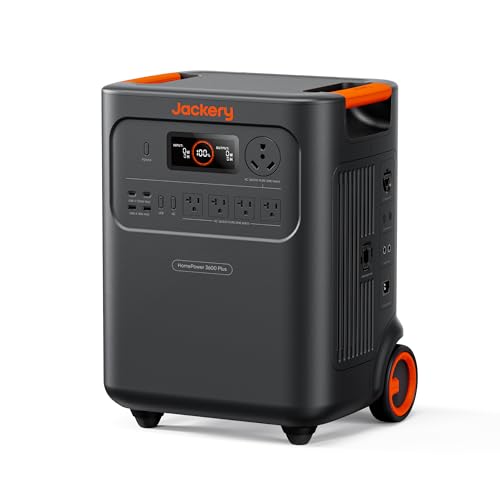
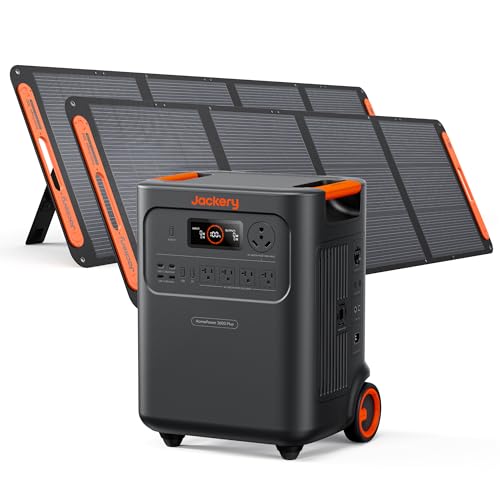
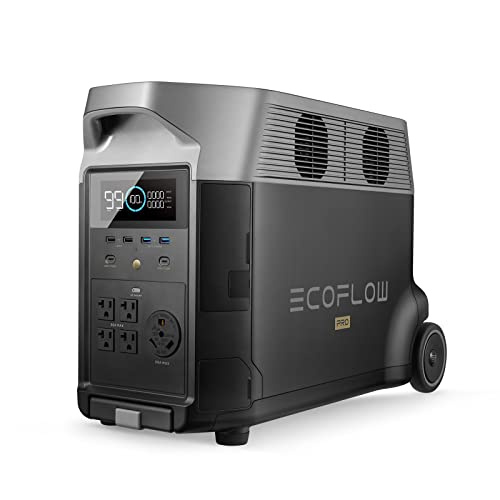
Several categories of equipment help turn these calculations into a working system. A portable power station with a large battery and multiple AC outlets suits renters and partial-home backup, and owners often report it is simple to set up for a refrigerator and internet during an outage. View on Amazon
For solar recharging during multi-day outages, a foldable solar panel designed to pair with a power station lets you add input without roof work. View on Amazon
A plug-in power meter helps you verify the watt-hour figures in Step 2 before you commit to a battery size, since many nameplate ratings overstate typical use. View on Amazon
A generator inlet and transfer switch kit lets a portable generator safely feed circuits during an outage without backfeeding the grid. Have a licensed electrician install it. View on Amazon
FAQ
How many watt-hours do I need for a whole home power backup system?
It depends on your daily use and outage length. Many households with essential loads only need 3 to 5 kWh, while whole-house backup often requires 10 kWh or more. Calculate your daily watt-hours, multiply by the number of days, and add roughly 15 to 20 percent for losses.
Can a whole home backup run central air conditioning?
Possibly, but air conditioners have high startup surges and consume a great deal of energy. Most homes need a large battery bank, a high-surge inverter and solar or generator input to run central air for more than a few hours. Soft-start equipment can reduce the surge requirement.
How long will a whole home power backup system last during an outage?
Runtime depends on battery capacity, your load and recharging. A 10 kWh system powering 1 kWh per day lasts about 10 days without recharging, but real-world runtime is usually shorter because loads fluctuate and batteries have depth limits.
Do I need an electrician to install a whole home system?
Plug-in portable stations do not require installation. Any hardwired connection to your main panel, subpanel or transfer switch should be done by a licensed electrician and inspected according to local code.
Can I run a generator and solar at the same time?
Many hybrid inverters accept both inputs, but the system must be designed for it. Confirm with the manufacturer and your installer that the inverter supports simultaneous charging sources and that the wiring meets code.
Will a whole home backup system work during a storm?
Yes, if the equipment is protected from water and wind and the solar or generator input is accessible during the storm. Solar output drops in heavy cloud cover, so rely on battery reserve or a generator for multi-day events.
How do I maintain a whole home power backup system?
Check battery and inverter status monthly, run a load test quarterly, keep ventilation clear, and follow the manufacturer’s storage temperature guidance. Replace components as the warranty and manual recommend.
Is a whole home backup worth it compared with a generator?
It depends on your priorities. Batteries are quiet, need no fuel and switch over automatically in many setups, while generators offer long runtime and handle high loads more easily. Many homeowners combine both for resilience.
Conclusion
A whole home power backup system is built from a clear calculation: list your essential loads, convert them to daily watt-hours, multiply by your outage target, and size the battery and inverter with margin. Decide how you will recharge, choose an integration method that matches your home and budget, and verify the numbers with a meter. Work with a licensed electrician for any permanent connection, and revisit your plan whenever your household changes.
Related reading
- Whole-Home Backup Power Solution: How to Size One for Outages (2026)
- Home Backup Power Systems: A Step-by-Step Guide to Sizing for Outages (2026)
- 7 Best EcoFlow Delta Pro Ultra X Whole-Home Backup Power Options for 2026
- Top 5 EcoFlow Power Stations with Solar Panel Options for Home Backup (2026)
- Jackery vs Bluetti vs Anker: Which Home Backup Power Station Fits Your Outages?
Ready to choose one?
About Lauren Holland
Lauren Holland is part of our editorial team and reviews and edits our solar generators for home backup & emergencies guides, checking product details against manufacturer specifications and owner feedback.